
Introduction
Have you ever looked at a receipt and wondered how much an item cost before sales tax was added? Or perhaps you know the final amount paid but need to separate the original price from the tax for accounting, budgeting, or bookkeeping.
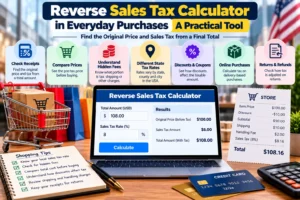
The reverse sales tax formula helps you solve this problem by calculating the original price from a total that already includes sales tax.
In the United States, sales tax rates vary by state and locality. A purchase may be subject to state, county, city, and special district taxes, depending on the location and transaction. As a result, knowing the total price alone is not enough to calculate the original amount accurately. You also need the correct combined sales tax rate.
The good news is that the calculation is straightforward once you understand the formula. This guide explains how reverse sales tax works, provides practical examples, identifies common mistakes, and shows how to calculate sales tax backwards using a calculator or spreadsheet.
What Is Reverse Sales Tax?
Reverse sales tax is the process of separating sales tax from a final price that already includes it.
Ordinarily, a seller calculates sales tax by multiplying the taxable purchase price by the applicable tax rate. The tax is then added to the original price.
Reverse sales tax works in the opposite direction. You start with the final total and calculate how much of that amount represents the original price and how much represents sales tax.
For example, suppose you paid $108.25 for an item and the applicable sales tax rate was 8.25%.
Using reverse sales tax, you can determine that:
- Original price before tax: $100.00
- Sales tax: $8.25
- Final price: $108.25
This method is useful for consumers checking receipts, businesses reconciling transactions, and sellers who advertise tax-inclusive prices where permitted.
It is important to distinguish reverse sales tax from calculating income tax backwards. Sales tax is generally calculated on taxable transactions under state and local rules, whereas income tax is based on income and other applicable tax provisions.
Reverse Sales Tax Formula
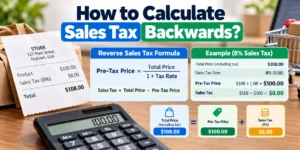
The reverse sales tax formula is:
Pre-taxprice=Totalprice1+Taxrate
To calculate the sales tax amount:
Salestax=Totalprice-Pre-taxprice
The tax rate must be written as a decimal rather than a percentage.
For example:
- 5% = 0.05
- 6.5% = 0.065
- 7.25% = 0.0725
- 8.25% = 0.0825
- 9.5% = 0.095
The formula works because the tax-inclusive total equals the original price multiplied by one plus the tax rate. Dividing by that same factor reverses the calculation.
How to Calculate Sales Tax Backwards
Follow these four steps.
- Find the final total. Use the amount that includes the sales tax you want to separate.
- Identify the correct tax rate. Use the combined rate applicable to the transaction, not automatically the statewide rate.
- Convert the rate to a decimal. For example, 8.25% becomes 0.0825.
- Divide the total by one plus the decimal rate. Subtract the resulting pre-tax price from the total to find the tax amount.
Worked Example
Suppose your receipt shows a total of $216.50, including 8.25% sales tax.
Step 1: Convert the tax rate.
8.25100=0.0825
Step 2: Add 1 to the decimal rate.
1+0.0825=1.0825
Step 3: Calculate the original price.
$216.50 / 1.0825 = $200.00
Step 4: Calculate the sales tax.
$216.50 – $200.00 = $16.50
The original price was $200.00, and the sales tax was $16.50.
Reverse Sales Tax Examples
The following examples demonstrate how the formula works with different totals and tax rates. These rates are illustrative; they are not statements of the current tax rate for a particular location.
| Total including tax | Tax rate | Price before tax | Sales tax |
| $107.00 | 7% | $100.00 | $7.00 |
| $108.25 | 8.25% | $100.00 | $8.25 |
| $106.50 | 6.5% | $100.00 | $6.50 |
| $275.00 | 10% | $250.00 | $25.00 |
| $1,088.75 | 8.875% | $1,000.00 | $88.75 |
Example 1: Reverse Sales Tax at 7%
Suppose you paid $107 for an item, including 7% sales tax.
The calculation is:
Pre-tax price =107 / 1.07 = $100
The sales tax is:
107 – 100 = $7
Therefore, the original price was $100, and the tax was $7.
Example 2: Reverse Sales Tax at 8.25%
A receipt shows a tax-inclusive total of $54.13, and the applicable rate is 8.25%.
Pre-tax price = 54.13 / 1.0825 ~ $50.00
Sales tax = 54.13 – 50.00 = $4.13
The original price was approximately $50.00, and the tax was $4.13. The result reflects rounding to the nearest cent.
Example 3: Reverse Sales Tax at 10%
Suppose a purchase costs $275, including 10% sales tax.
Pre-tax price = 275 / 1.10 = $250
Sales tax = 275-250 = $25
The original price was $250, and the sales tax was $25.
Example 4: Reverse Sales Tax on a Large Purchase
Suppose you paid $2,165 for equipment, including an illustrative 8.25% sales tax rate.
Pre-tax price = 2165 / 1.0825 = $2,000
Sales tax = 2165 – 2000 = $165
The original equipment price was $2,000, and the tax was $165.
For larger purchases, it is especially important to use the rate that applied to the transaction and verify the calculation against the invoice.
How to Calculate Reverse Sales Tax in Excel or Google Sheets
You can calculate reverse sales tax quickly in Excel or Google Sheets without performing the calculation manually.
Set up your spreadsheet with three columns:
| Cell | Description | Example |
| A2 | Total including tax | 216.50 |
| B2 | Tax rate | 8.25% |
| C2 | Pre-tax price | Formula |
| D2 | Sales tax | Formula |
In cell C2, enter:
=A2/(1+B2)
In cell D2, enter:
=A2-C2
If B2 is formatted as a percentage and contains 8.25%, the formulas will calculate a pre-tax price of $200.00 and sales tax of $16.50.
Format the output cells as currency with two decimal places.
Important: Do not enter 8.25 as the rate if the spreadsheet expects a percentage or decimal. Enter 8.25% or 0.0825 instead. Otherwise, the calculation will be incorrect.
For bookkeeping, you may also want to record the transaction date, location, taxable subtotal, tax rate, and source of the rate.
Why You Should Divide Instead of Subtracting the Tax Rate
A common mistake is to subtract the tax percentage directly from the final total.
For example, if an item costs $108.25 including 8.25% sales tax, you might try subtracting 8.25% of $108.25.
However, this produces the wrong answer.
| Method | Calculation | Result |
| Correct method | $108.25 ÷ 1.0825 | $100.00 |
| Incorrect method | $108.25 × (1 − 0.0825) | $99.32 |
The difference occurs because sales tax is calculated on the original taxable price, not on the final price.
When you subtract 8.25% of the final total, you calculate the percentage using the wrong base amount. The reverse sales tax formula corrects this by dividing the total by 1+taxrate.
How to Find the Correct US Sales Tax Rate
Finding the correct rate is often more difficult than doing the calculation itself.
In the United States, sales tax rates can include several components:
- State sales tax.
- County sales tax.
- City or municipal sales tax.
- Special district taxes.
The combined rate depends on the transaction’s location and the applicable state and local rules.
For example, a state might have a 6% statewide rate, while a particular locality adds another 2%. If both apply to the transaction, the combined rate would be 8%.
However, you should not assume that every local tax applies to every purchase. Taxability, sourcing rules, exemptions, and special provisions vary by jurisdiction.
To identify the appropriate rate:
- Check the tax rate printed on your receipt or invoice.
- If it is not shown, consult the relevant state’s department of revenue or taxation.
- For online or interstate transactions, check which jurisdiction’s sourcing rules apply.
- Use the rate in effect on the transaction date.
The Streamlined Sales Tax Governing Board provides resources related to participating states and sales tax administration. You can also consult the relevant state’s official tax agency for location-specific rates and rules.
Common Reverse Sales Tax Mistakes
Avoid these errors when calculating sales tax backwards.
Using the Wrong Tax Rate
Using only the state rate when local taxes also apply can produce an incorrect pre-tax price and tax amount. Always use the applicable combined rate.
Applying the Formula to Nontaxable Items
Not every product or service is taxable in every jurisdiction. If a receipt includes both taxable and nontaxable items, do not automatically apply the reverse formula to the entire receipt total.
First identify the portion of the total that includes the tax you are trying to separate. Follow the applicable rules for exemptions and mixed transactions.
Entering the Percentage Incorrectly
An 8% tax rate must be entered as 0.08 when using the decimal formula. Entering 8 instead of 0.08 will produce an incorrect result.
Ignoring Rounding
Sales tax is typically calculated and recorded in cents, but rounding conventions can vary according to jurisdiction and transaction processing rules. The reverse calculation may therefore differ slightly from the figures on an original receipt.
For accounting or tax reporting, use the actual documented transaction amounts where available rather than treating a reverse calculation as a replacement for the receipt.
Confusing Sales Tax With Income Tax
Reverse sales tax is a mathematical method for separating sales tax from a tax-inclusive price. It is not a method for calculating federal income tax, payroll taxes, or tax refunds.
Frequently Asked Questions
What is the reverse sales tax formula?
The reverse sales tax formula is:
Pre-taxprice=Total1+Taxrate
Convert the tax rate to a decimal first. Then subtract the pre-tax price from the total to find the sales tax.
How do I calculate sales tax backwards from a total?
Divide the tax-inclusive total by one plus the applicable tax rate expressed as a decimal. For example, $107 divided by 1.07 gives a pre-tax price of $100 at a 7% rate. The tax is $7.
How do I remove 8.25% sales tax from a price?
Divide the total by 1.0825. For a total of $108.25, the original price is $100, and the included tax is $8.25.
Can I calculate reverse sales tax without knowing the tax rate?
Not accurately in most cases. You need the applicable tax rate or enough reliable information to determine it. A total alone generally does not reveal how much tax was included.
Is reverse sales tax the same in every US state?
The mathematical formula is the same, but the applicable rate, taxable items, exemptions, sourcing rules, and rounding requirements can vary by state and locality.
Can I use reverse sales tax for business accounting?
Yes. Businesses can use it to separate the taxable sales amount from tax-inclusive revenue when appropriate. However, actual sales tax reporting must follow the relevant jurisdiction’s rules and the business’s documented transactions.
Conclusion
The reverse sales tax formula is a practical way to calculate the original price and sales tax from a total that already includes tax.
Remember the two essential formulas:
Pre-taxprice=Total1+Taxrate
Salestax=Total-Pre-taxprice
Use the correct combined rate, convert percentages to decimals, and account for taxable and nontaxable items separately when necessary.
Whether you are checking a shopping receipt, reconciling business invoices, or preparing sales records, understanding reverse sales tax helps you separate the original price from the tax included in the total.
Disclaimer: This article is for educational purposes only and does not constitute tax or legal advice. US sales tax requirements vary by state and locality. Consult the applicable tax authority or a qualified tax professional for guidance on a specific transaction.